


The Matrix "Media Privacy" feature allows you to restrict the photos you've added to your listings from public view once your listing closes, expires, or is withdrawn. When you select a photo to remain public, once the listing is taken off market all other photos will no longer be available in data feeds to public facing websites and services. All photos on your listing will always be visible in the MLS, on the other hand.
When you have added photos to a listing, each photo will have a menu button - the "three dots" beneath the right corner of the image thumbnail. Click here, then click "Make Permanent" - this is now the designated "public" image, the one that will still appear on public websites after the listing closes.
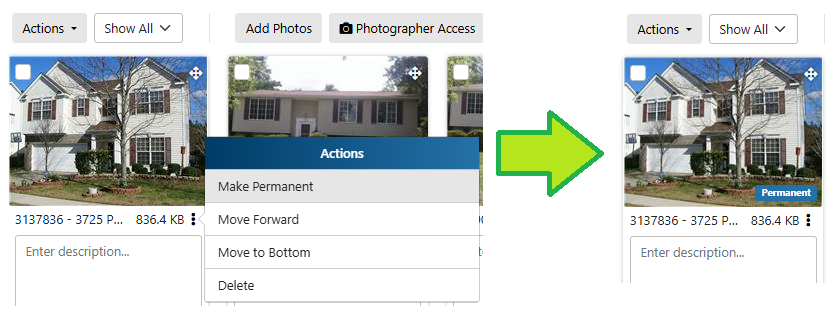
If you want to designate a different image, simply click the menu button on another photo and select "Make Permanent" there.
If you want all photos to remain public even after the listing goes off-market, click the menu button and select "Remove permanency".
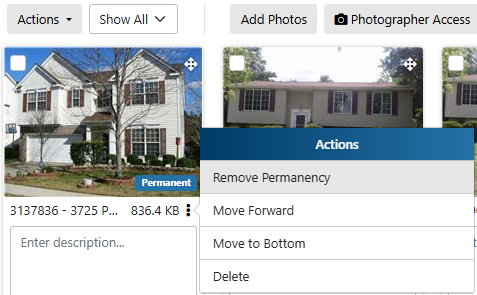
While your listing is on-market - that is, it's in Coming Soon, Active, Application Received, Under Contract Show, Under Contract No Show, or Temporary Off Market status - all photos will be displayed with your listing everywhere it appears. Once the listing changes to Closed, Expired, or Withdrawn status only the "Permanent" photo will be visible publicly. Again, all photos remain available for anyone in the MLS.
You are able to designate a "permanent" photo for your listing at any time from the moment you first add the image up to 30 days after your listing is taken off market.

